
When you buy through our links, Business Insider may earn an affiliate commission. Learn more
The iPhone 18 Pro in Glacier blue is so nice you won’t want to put a case on it. But you should.
Sarah Saril/Business Insider
In September 2026, Apple announced its new generation of smartphones: the iPhone 18 Pro and Pro Max. I’ve spent a month with the former, testing the device as a daily companion to see if it’s worth trusting as yours. I also put the manufacturer’s shiny new features to the test, and to spoil the story, the iPhone 18 Pro surprised me with improvements in photography and performance that make it particularly enticing as an upgrade.
For the most part, it’s not worth shelling out if you’re an iPhone 17 or 17 Pro owner considering the leap. However, if you’re coming from an older device or are a new Apple user altogether, it’s an excellent step forward for the product line.
Specification Details
Starting price 256GB : $1,199; 512GB : $1,399; 1TB : $1,799; 2TB : $2,399
Colors Burgundy, Glacier, Silver, Black
Release date September 18, 2026
Durability IP68, Ceramic Shield 2 front, Ceramic Shield back
Display 6.3-inch Super Retina XDR at 460 pixels per inch
Resolution 2622 × 1206
Refresh rate Up to 120Hz
Peak brightness 1,600 nits (HDR), 3,000 nits (outdoor)
Processor A20 Pro Chip
RAM 12GB
Storage 256GB/512GB/1TB/2TB
Rear cameras
48MP 24 mm, ƒ/1.48, ƒ/1.8, ƒ/2.8, ƒ/4.0 Main
48MP 13 mm,ƒ/2.2, 120° field of view Ultra Wide
48MP 100mm, ƒ/2.8 Telephoto
Selfie cameras 18MP ƒ/1.9 Center Stage
Camera zoom 40x digital zoom, 8x optical zoom in, 2x optical zoom out, 16x optical zoom range
Video 4K Dolby Vision at 24, 25, 30, 60, 100, or 120 fps, 24x digital zoom
Battery capacity 4,288 mAh (eSIM), 4,056mAh (physical SIM)
Claimed battery life Up to 36 hours
Wired charging 60W wired
Wireless charging 25W Qi2
Dimensions 5.91 × 2.83 x .34 inches
Weight 7.44 oz (211g)
Connectivity WiFi 7 (802.11be); 2×2 MIMO; Bluetooth 6; NFC; 5G mmWave/Sub-6 GHz/LTE
SIM support
Dual eSIM (North America, Japan, UAE)
Nano-SIM, plus eSIM (UK, Australia, Singapore)
Operating system iOS 27
Software support period Approx. 7 years (2033)
Biometrics Face ID
In terms of improvements, the new generation iPhone 18 Pro (middle) has come a long way since the iPhone 15 Pro Max (right), but it’s not that different from the base iPhone 17 (left).
Sarah Saril/Business Insider
Design: Familiar, but improvements hide within
With the naked eye, not much has changed on the iPhone 18 Pro. Its footprint and screen size are the same as the 17 Pro, and it’s so similar that many third-party brands designed a single case for both models. The buttons are in the same place, and the camera block remains unchanged. However, the 18 Pro and Pro Max do have serious hardware upgrades that make a big difference across select features.
The first major selling point for this new generation is the variable aperture on the main camera lens. More than a digital upgrade, this physical change features super-thin blades controlled by a rotor to ensure a smooth transition between apertures. It’s hard to see and even harder to photograph, but believe me: you can see the aperture change if you look closely at the main lens while doing so.
Buttons and their placement remain the same as on the iPhone 17 Pro, but the real improvements are hidden within.
Sarah Saril/Business Insider
The other major improvement for this device is an internal restructuring to enhance heat dissipation. I’ll go into more detail on the effectiveness of this change in the performance section.
The iPhone 18 Pro features an upgraded Ceramic Shield 2 display that is resilient to cracks and scratches, even without a protector.
Sarah Saril/Business Insider
Display: Remains the same, save for fresh Dynamic Island features
With every new iPhone release, Apple tends to focus on some aspect of the device for major improvements. Last year, the 17 line saw a big display overhaul, so this year, the display remains largely the same. The 18 Pro uses the same 6.3-inch ProMotion screen with an adaptive refresh rate up to 120Hz for smoother visuals throughout. Brightness capabilities, PPI, and other specs also remain the same.
The one major display upgrade brought about in the iPhone 18 Pro and Pro Max is more Dynamic Island capabilities. The black ellipse where the selfie camera and Face ID hardware are hidden has, for years now, been an adaptive status indicator. Previous iOS users have probably at least seen it in their periphery, displaying music player buttons, navigation instructions, and other activity information.
The iPhone 18 Pro introduces minor improvements to the Dynamic Island that work seamlessly with Siri AI.
Sarah Saril/Business Insider
Improvements this year have reduced the Dynamic Island’s minimum footprint, freeing up more space for regular screen use. Conversely, it can now juggle up to three activities at a time, instead of only two. It’s a seemingly minor change, but iOS users who are trained to tap it for quick app interactions may find it a welcome one.
It also interacts seamlessly with Apple’s new Siri AI. Since the Apple Intelligence feature seeks to fill in gaps throughout your daily phone usage, it really works that the Dynamic Island is home to a lot of those processes. For example, kicking off a search with “Hey Siri” or holding the lock button results in Siri’s response blooming from the Dynamic Island with a very organic animation that looks good and runs smoothly.
The only other change is that the Ceramic Shield introduced in the last generation has been upgraded to the Ceramic Shield 2. It feels similarly smooth and boasts increased durability. In use, it seems especially scratch-resistant and durable, but I still always recommend a good 18 Pro screen protector just in case. A good iPhone 18 Pro case also goes a long way to preventing damage to the display and device as a whole.
The new processor makes performance an afterthought, thanks to fast load times, seamless app switching, and more.
Sarah Saril/Business Insider
Performance: Smooth, and most notably, heat disperses better
The iPhone 18 Pro comes furnished with the A20 Pro chip, a new development for this generation. Advertised as an all-around improvement over the A19 Pro, in layman’s terms, the new processor should deliver faster graphics rendering, smoother multitasking, and better AI workload management.
In testing, the 18 Pro offers snappy performance across gaming, Apple Intelligence processes, and more. Hefty titles like League of Legends: Wild Rift load faster than on older devices. Switching between apps is seamless, with no stuttering that could inhibit an urgent photo snap or online search. It’s a marked improvement, noticeable because I’m testing a new phone against its predecessor — but I’m not sure it’ll be such a stark difference for your average Apple shopper.
However, if you’re coming from an iPhone 16 or earlier, there may be a real performance change worth upgrading for. The N1 wireless networking chip (first introduced in the iPhone 17 and carried over to the 18 Pro and Pro Max) can make a real difference when chasing down a signal out in the wild. When using an iPhone 15 Pro Max and an iPhone 18 Pro in the same room, the latter could sometimes connect more easily than the former — its connection was also steadier.
New to this generation is the C2 cellular modem, which determines your signal reliability along with other factors. When tested against the iPhone 17 on the same carrier in the same room, I have yet to notice any major difference in network connectivity.
Apple improved the vapor chamber it introduced last year, increasing its surface area and using more heat-conductive materials.
Apple
A hardware change that directly affects performance is the new thermal management system in the iPhone 18 Pro and Pro Max. This is a direct solution to overheating and crashing issues that users can experience when streaming shows, using Apple Intelligence, or juggling several apps at once.
With reorganized chip packaging that redirects heat away from the processor, the 18 Pro makes a strong case for upgrading with this feature. It’s a marked improvement over older devices, especially the 15 Pro and Pro Max generations, which were known for heat-dissipation issues due to the seemingly premium titanium frame, which Apple ditched from the 17 Pro onwards. Anecdotally, I find the new device doesn’t get hot easily, even during long mobile gaming sessions and lengthy AI queries while plugged in.
When out in the sun, the 18 Pro retained less heat than the 17, which surprised me during testing.
Sarah Saril/Business Insider
For a more quantifiable test, I left both the iPhone 17 and the iPhone 18 Pro out in the sun on an 85-degree day in California. Both devices were running League of Legends: Wild Rift with the screens set to max brightness. After 10 minutes in the sun, the new phone was over three degrees cooler — a slight but important gap.
While it’s easy to write off an old iPhone’s poor performance to planned obsolescence and dwindling battery capacity, the 18 Pro definitely stands out as an overall improvement worth upgrading to for users of devices two to three generations older. If you’re coming from the 17 Pro, it’s not a big enough step to warrant the price.
iOS 27 users need to opt in to Siri AI to unlock the chatbot, camera search, and more.
Sarah Saril/Business Insider
Apple Intelligence: Hardly a selling point, but it doesn’t hurt
Every year, Apple pushes Apple Intelligence as a major selling point for its new devices. With every manufacturer across the tech industry looking to implement AI as an accessible streamlining tool, it’s not surprising — but it’s rarely a game-changing feature for users. When testing iOS 27 on the iPhone 18 Pro, I found that statement mostly rings true again.
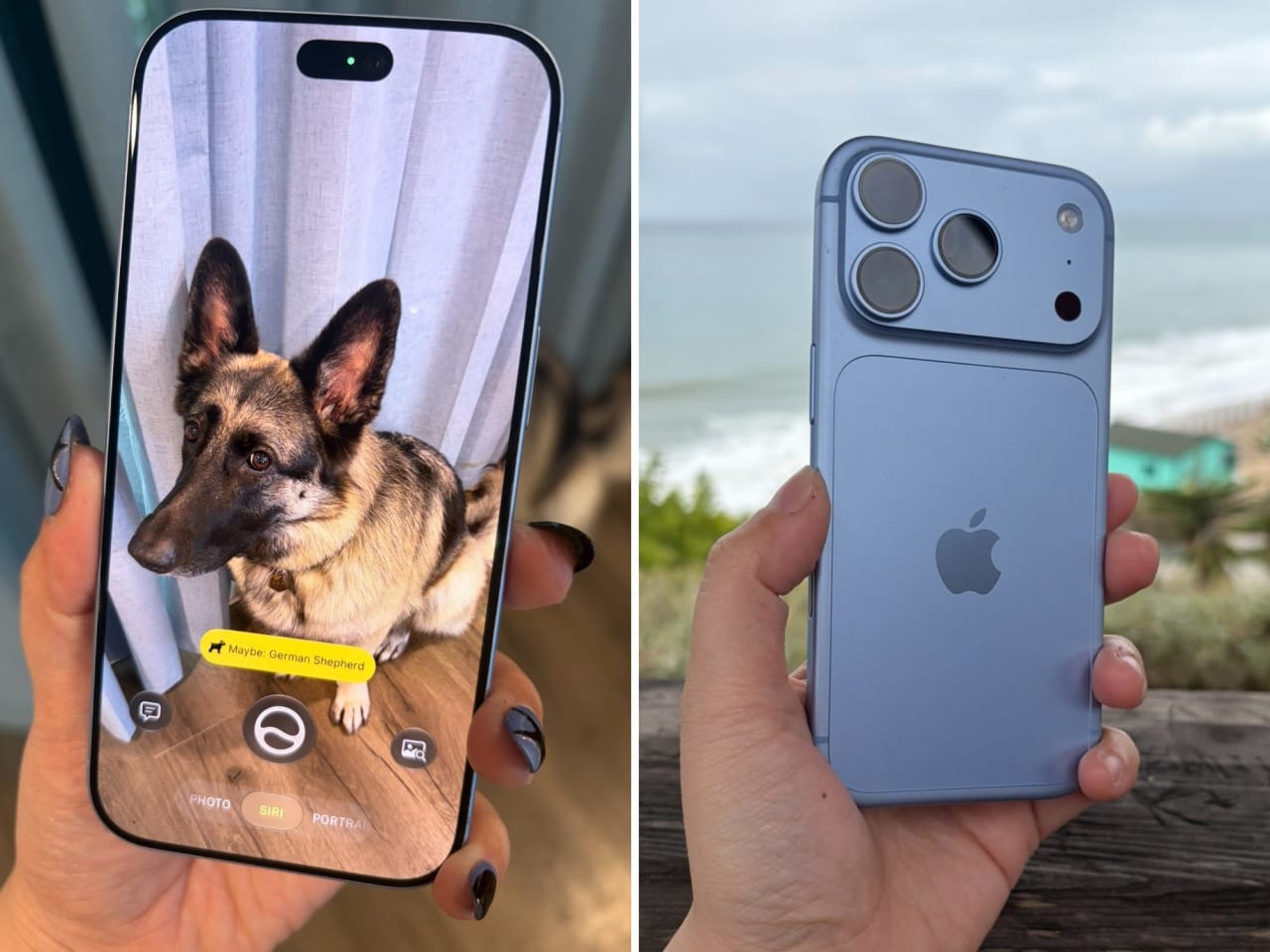
Siri AI is the manufacturer’s biggest achievement in this field, and the feature (currently in beta with a brief waitlist) aims to simplify processes for iOS users across the board. Forget about asking to set a timer or dial your mom’s phone number; think instead of having entire tasks taken off your plate. From pointing your camera at an object for Siri to identify to completing app-specific tasks, it’s a promising IQ jump for the smart assistant.
Powered by ChatGPT, your queries can lead to full back-and-forth conversations, not unlike the free web browser tool. Instead of having to repeat the context, you can continue asking questions about the same subject, making information gathering much simpler. It’s handy for satisfying your curiosity, verifying facts in an argument, or even figuring out how to use an iOS 27 feature.
Once you turn it on, Siri AI is everywhere.
Sarah Saril/Business Insider
In practice, Siri AI is a smooth addition to regular IOS functions, albeit a bit overeager. Here’s what I mean: swiping down on your home screen brings up Siri instead of the old search bar, which can now hunt for files, images, web results, and more. The Siri camera is wedged between the normal and Portrait modes, making it very convenient but easy to switch on accidentally. Text suggestions are replaced with “Write with Siri,” whether you’re drafting an important email or texting a friend.
Its functions work best with descriptive prompts: “Is there a doorbell deal on this page?” is likely to be more successful than “Are doorbells on sale?” Using the Siri app is also the best way to pursue a query, since it shows a chat log you can scroll through — though all of your requests, verbal and text, are eventually logged there.
AI chatbots have a reputation for unreliable information, and Siri AI is no different.
Sarah Saril/Business Insider
The greatest pitfall of Siri AI is one that likely won’t be solved as it’s moved out of beta, and one that plagues all AI: it’s not 100% accurate, but it speaks like it is. It answers to the best of its ability, but like an overconfident friend, Siri won’t tell you when it’s taking a shot in the dark. In the image above, it continued to get the freshwater plant species wrong, moving further away from the correct species as the conversation proceeded. It also guessed the fruit tree on the right was a kumquat or a lemon multiple times, landing on the correct answer, a calamansi (or calamondin) tree, from certain camera angles.
I can wax poetic about overreliance on AI and how I feel about it, but in the end, it all comes down to a need for fact-checking. Siri AI is powered by ChatGPT and, therefore, requires the same level of caution when used. It’s a handy tool for getting answers and completing simple tasks, but you should never trust it entirely for important life decisions, graded work, or potentially life-threatening situations. The chat is a great starting point, especially because Siri cites its facts with links to articles that you can click through for a fuller picture.
In addition to a more capable smart assistant, Apple also introduced sweeping improvements and capabilities to Photos. For one, Clean Up has been improved over previous iterations. The photo editing tool lets you use your finger as a brush to paint over stains, clutter, and other unsightly objects, smoothing over your selections with the power of Apple Intelligence. In practice, this feature failed most of the time.
Clean up sounds nice as a tool, but in practice, it rarely delivers.
Sarah Saril/Business Insider
At best, it struggled with textures, as is to be expected of most AI-generated photo editing at this point. Mattress stains could be removed, but it failed to replicate the tufting pattern accurately, resulting in a visibly inauthentic edit. In the example above, it’d seem like removing the tiny cars on the highway would be a simple fix, yet somehow, it turned a clear photo into an oddly blemished one. It reminds me of the “ghost orbs” you see on ghost-hunting shows.
With simple images, Apple Intelligence’s extending feature works — but it struggles with more cluttered pictures.
Sarah Saril/Business Insider
Other photo editing features, like spatial reframing and image extension, work with varying degrees of success. Simple subjects, like my dog in front of the curtains and the wooden floors above, are easy for Apple Intelligence to recompose. More complex photos can result in artifacting and nonsensical creations attempting to fill in the gaps — something many internet users have come to associate with AI-generated imagery at this point.
Another selling point for Apple Intelligence during this year’s announcement was the addition of capabilities to Image Playground, iOS’ built-in AI image generator. New in this update, the app now includes photorealistic images, more style options, direct image editing through text or touch, and more.
Playground functions a lot like a typical ChatGPT request, but with more limitations.
Sarah Saril/Business Insider
It doesn’t take long fiddling around in the Playground to realize it’s just a sleek yet limited take on ChatGPT image creation. While it does add handy controls for style, reference images, and photo ratios, it has more constraints. For example, brand-specific requests are rejected outright. When asked to regenerate an image in a Studio Ghibli style, I was prompted to use different descriptors. When I asked for the Kool-Aid Man eating at In-N-Out, I received “Unable to use that reference.”
The 18 Pro’s camera is versatile enough for capturing short-lived, everyday moments or posed, artistic shots.
Sarah Saril/Business Insider
Cameras: Impressive, and the variable aperture allows you to control your shot
Perhaps the most exciting new aspect of the iPhone 18 Pro is the addition of variable aperture to the main camera, allowing users to toggle between four settings: f/1.48, f/1.8, f/2.8, and f/4.0. For casual photo-takers, the phone can handle these automatically, adjusting to best fit the situation you’re in; for anyone even remotely interested in controlling their own photography, it opens a world of possibilities.
An impressive amount of detail is conveyed in low-light photography, though it still can’t match the quality of a cloudy day on camera.
Sarah Saril/Business Insider
It’s a physical change to the phone itself, which can be simplified to this: a lower number results in a blurrier background by letting in more light, better for moving objects and low-light situations. A higher number keeps more of the scene in focus, best for stationary models and sunny days. Most of the time, a middle-of-the-road f/1.8 gets the job done.
On the downside, the expanded suite of pro camera controls can be overwhelming for users uninterested in artistic photography. It’s not hard to accidentally toggle a setting, set a timer, change the lens, or zoom in super close, especially with the easily actuated Camera Control button. It’s difficult to strike a balance between accessibility and oversimplification, but it’s worth noting: the camera app might be unintuitive for some users.
Opening the lens aperture settings while taking pictures shows how the phone automatically adjusts to fit your subject.
Sarah Saril/Business Insider
Whether you plan to touch the settings or not, it’s a pretty big step forward for Apple’s on-device main camera. Previous iPhones, including Pro models, used a fixed aperture combined with digital processing after the photo is taken (i.e., blurry backgrounds in Portrait mode) to generate the quality the brand is known for. This works fine, but can sometimes lead to a visible lack of authenticity, especially around tricky edges like hair, glasses, and greenery.
Now, the 18 Pro and Pro Max automatically adjust the physical lens aperture as needed to best capture your subject, unless you choose to tweak it manually. The Ultra Wide and Telephoto cameras, however, still have a fixed aperture of f/2.2 and f/2.8, respectively.
From slow-moving Disneyland rides to energetic stage performances to darting freshwater fish, the 18 Pro captures stunning raw photos with surprising clarity.
Sarah Saril/Business Insider
In practice, this results in crisp details and an elevated quality for my everyday photo-taking across the board. As a casual photographer, I don’t have the terminology or the know-how to make my photos shine, but the automatic setting does the work for me, resulting in high-definition photos I sometimes don’t expect.
Even in motion, the 18 Pro captures crisp, high-detail photos, like this hurried shot I snapped of a squirrel eating a napkin.
Sarah Saril/Business Insider
I choose to take the shot every time, knowing it may come out unfocused or blurry — after all, what if I never see another squirrel shoving a napkin into its cheeks ever again? How will the group chat ever believe me? The iPhone 18 Pro camera has rewarded my efforts with snapshots of startling clarity, looking good as-is or providing a perfect base for further editing in Apple’s revamped post-processing suite.
Apple Photos always felt lacking as a standalone photo editor, but the 18 Pro and Pro Max-exclusive texture sliders fill the gaps.
Sarah Saril/Business Insider
Photographic styles finally cover all the bases to replace your photo editing apps
Apple didn’t just upgrade the camera’s hardware with this generation; it also upgraded the suite of editing tools available after you get the shot. Officially termed Photographic Styles 3, the new generation of phones has a few additional capabilities, primarily in the texture category.
When you take a photo on an iPhone 18 Pro or Pro Max, you’ll be able to edit it, as iOS users have been able to for a while now. In the Styles section, tap Customize to find the new features, broken into three sliders: soft skin, glow, and film, each with a toggle to add or remove grain.
Photogenic Styles 3 introduces settings that can enhance a subject’s appearance or add creative flair.
Sarah Saril/Business Insider
For social media posters, the soft skin and glow options are the additions that make this upgrade. After all, many iPhone users are snapping selfies and taking pictures in front of landmarks for posting — yet Apple skipped the beautifying feature until now, even though so many apps and smartphone manufacturers have had it for years. Now, the new device lets you remove blemishes from a person’s skin or add a glow that resembles full-glam makeup. Results can vary depending on the subject’s skin tone and age, but I was pleased with how it performed on light, senior, and medium-tan skin tones.
The film and grain settings hit that vintage feel, evoking the days when traditional camera use was more common. At its best, it does exactly that — at its worst, it can come across like an Instagram filter from 2010. Ultimately, it’s up to how you use it. The soft skin and glow sliders are subtle enough that maxing them out hardly ruins a photo, but you need an eye for how to use the film and grain options.
In conclusion, it’s an excellent upgrade that considerably broadens the audience for Photographic Styles. It won’t please social media filter users; after all, nothing can replicate the power of Snapchat’s puppy filter. But the subtle effects lend more authenticity, perfect for users who want a light touch-up, overall smoothing, or a nostalgic-feeling grainy photo. The upgrade is a real win.
Since there’s no iPhone 18, shoppers who want to upgrade this generation need to get a Pro or Pro Max model.
Sarah Saril/Business Insider
Should you buy the iPhone 18 Pro?
As the time of writing, Apple has nixed (or likely delayed until Spring) the base iPhone option for the 18 lineup — only the Pro and Pro Max are available for purchase. That means base iPhone users of previous generations have no choice but to make the jump to Pro if they want a new ’18’ device right now. Or pay even more for the new iPhone Duo.
Before testing the iPhone 18 Pro for this review, I was a die-hard base iPhone user. Initially, it started because of budgetary restrictions, and the device felt sufficient for my needs anyway. As the years went on, I still couldn’t justify paying more for the premium model. However, after experiencing my first Pro model, I’m not sure that I can go back.
Aside from the color lineup, size, and lens count, there are quite a few differences between the base and Pro models year after year. The latter tends to get a better display, extra camera versatility, Apple’s latest processor, premium materials, and better battery life. Its higher price is justified by the phone’s better quality in all aspects.
Concert-goers can benefit a lot from upgrading to a Pro or Pro Max because of the Telephoto lens’s powerful zoom.
Sarah Saril/Business Insider
One of my favorite upgrades is the Telephoto Lens and its zoom power. As a fan of live music, I’m no stranger to the struggle of cheap seating in the back of a venue. It usually means I’m stuck watching the big screen for any details, which limits me to a very narrow section of the stage. When I brought the iPhone 18 Pro to a music festival, I was delighted not only by the clarity of my photos but also by the option to use the device as glorified opera glasses. By aiming the camera and zooming in, I had my very own, clear, self-directed feed of the stage.
Outside these rarer applications, the 18 Pro’s lengthy battery life has not gone unnoticed, either. Charging overnight is optional, not a necessity. The A20 chip delivers buttery-smooth performance for gaming, streaming videos, and using Apple Intelligence, which is more prominent on iOS 27 than ever.
If you’re on the fence about making the jump to a Pro model, I’d never recommend uncomfortably stretching your budget for it. However, if it’s a spend you can make, it’s a powerful and undeniable upgrade for fans in the stands, avid mobile gamers, and anyone tired of constantly charging.
Check out my guides to the best iPhone 18 Pro screen protectors and 18 Pro cases to keep your new device safe.
Read the original article on Business Insider