
When you buy through our links, Business Insider may earn an affiliate commission. Learn more
Sarah Saril/Business Insider
I’ll say it: I hate going outside to shop. I love exercising the full capabilities of my Amazon Prime membership to get everything big and small, even if that makes me a juicy target for porch pirates. Luckily, the right smart video doorbell is usually enough of a deterrent for most homes.
Get to the point : The Ring Pro Wired Doorbell is our top pick of video doorbells thanks to its impeccable video quality and powerful motion sensing. Shoppers on a budget can opt instead for the Ring Battery 2K for the lowest possible price, or the Wyze Duo Cam Doorbell , which doesn’t need a subscription.
Beyond scaring off sticky-fingered pedestrians, these handy devices let you vet your visitors, speak with delivery people, and detect suspicious activity without ever getting up from your chair. They’re a necessity for users who can’t work remotely or travelers who need to keep tabs on house sitters.
I spent months putting the best video doorbells to the test to find the ones that are actually worth trusting with your home. What I found was that a precious few can go without a monthly subscription cost, but in exchange, you may never have to get up and answer the door ever again.
Our top picks for the best smart video doorbells
Best overall : Ring Pro Wired Doorbell
Best for Google smart home users : Google Nest Doorbell
Best battery : Ring Battery Doorbell 4K
Best budget : Ring 2K Battery Doorbell
Best subscription-less : Wyze Battery Doorbell
Smart doorbells and hidden costs
One of the biggest caveats to smart doorbell ownership is that almost none offer a full set of features without additional costs. Subscription fees, memory cards, and other added fees are necessary to use features like 24/7 recording, motion detection, and AI alerts from most brands. So when friends and family ask me, “Which one doesn’t cost extra money?” it is difficult to answer. Unfortunately, aside from the Wyze Duo Cam, which requires a one-time microSD card purchase, there aren’t really any.
Each brand has its quirks and membership snags that I’ll dive into below. As a rule of thumb, be prepared to pay for a monthly subscription to get the most out of your doorbell, or lower your standards to something less featureful than the video doorbells you see catching TikToks and Instagram Reels.
Best overall
This doorbell has the best camera of any device on the market. Most folks won’t need crystal-clear quality to keep tabs on their front doorstep, but it sure doesn’t hurt. The Wired 4K Pro delivers beautiful video quality that captures every detail in real time, so you can see the exact pattern on the door-to-door solicitor’s tie when you turn them away from the comfort of your couch.
That said, since the device’s video storage is cloud-based, clip recording quality is reliant on your network connection. In simpler terms, bad internet will result in poor video quality. There’s no way around this: in the event of a total outage, Ring only offers periodic snapshot images to give you an overall idea of what’s going on outside your door.
Of all the smart doorbells I’ve tested, the Ring Pro has stunning camera quality that can help when deciphering labels or differentiating faces.
Sarah Saril/Business Insider
Ring notifications are immediate with rich context. While it may seem like a no-brainer that all video doorbells offer fast notifications, my testing found it’s not as universal a feature as you’d think. In reality, several devices experience lag between when a visitor presses the button and when your phone pings you about their presence. With all of Ring’s doorbells, this wasn’t a problem — each device offered snappy, immediate notifications, making it easy to respond to your visitor promptly.
Extra details were helpful, too. In the app and in the notification banner, additional information is provided to help you determine the best course of action. Whether it’s a person, dog, cat, doorbell press, or package delivery, you’ll know without ever lifting a finger.
It’s one of the doorbells that is most reliant on a subscription to work properly. One of the greatest detractors to the Ring 4K Pro is its reliance on a Ring subscription. Rather than leaning away from monthly payments, this device depends on them for features as simple as cloud recording, video history, person/package/vehicle alerts, and more. That said, it may cost you as little as $5 a month (or $50 a year ) to cover a single Ring Doorbell.
So long as you don’t mind paying, it’s one of the best video doorbell subscriptions you can find because of its sliding-scale plans and powerful performance. Without Ring Protect, your doorbell will be limited to only live view and real-time alerts.
All of Ring’s doorbells are locked to Alexa — no Google or Apple Home compatibility. The other main downfall of Ring is that the Amazon-owned device only pairs with Alexa. Apple HomePod and Google Nest users won’t be able to pair a Ring with their smart speakers and displays. As frustrating as that may be, the connection between Alexa and Ring is seamless. It’s one of the best integrations I’ve found in my testing yet, with smooth doorbell-to-smart-display interactions that make it easier than ever to keep tabs on your front door.
I already have an Echo speaker I can use with my Ring Doorbell, but if you don’t have one, you’ll need to get a Ring Chime.
Sarah Saril/Business Insider
Don’t forget the chime. While the Ring Pro 4K can always alert you from your smartphone, for the traditional doorbell experience, you’ll need a chime, or at least an Echo smart home device, to act as a speaker. The Ring Chime can be simple, starting at $35 for a plug-in add-on that connects via Bluetooth or WiFi — or you can shell out for a Ring Chime Plus , which features customizable tones, a built-in night light, and more. Personally, I use a network of Amazon Echo speakers and displays that ring throughout my house when someone is at the door.
Best without a subscription
It’s one of the most affordable options we tested, and you won’t need to buy a chime. I’ve listed it as the best video doorbell without a subscription, but make no mistake: the Wyze Duo Cam is also a solid budget pick. It comes with a chime and doesn’t require a monthly subscription for full functionality, so unlike Ring picks, it has far fewer hidden costs. That said, you will need to buy a microSD card (a high-endurance option from SanDisk or Samsung should do the job) to insert if you’re interested in storing video, but that’s a one-time cost, unlike cloud storage payments.
If you’re wondering why you can’t opt for a cheap, no-name brand microSD to use with your Wyze Doorbell, the main reason has to do with longevity. Choosing a subpar option can result in earlier failure and the potential loss of important video recordings. High-endurance options like the ones I’ve listed above are built for constant reading and writing, meaning they’re not only fast at it but also durable enough to do it time and time again.
The camera is good enough and provides two angles for better surveillance. You won’t really find 4K video resolution outside Ring, so don’t be disappointed by Wyze’s 2K feed. It’s good enough quality to determine who is at your door, and thanks to the two cameras on the Duo Cam, you get multiple angles to reduce blind spots. The front-facing lens captures individuals and distant objects well, while the downward-facing camera is perfect for monitoring packages.
For a one-and-done doorbell, Wyze’s model is the best you’ll get at avoiding hidden costs — but it’s not perfect.
Sarah Saril/Business Insider
Works with Google Home and Alexa with limited capabilities. Wyze’s DuoCam is also compatible with both Google and Alexa, making it easier to integrate into already-established smart homes. That said, the device’s pairing with either smart assistant can be lackluster at times, lacking the smooth fit of Ring and Nest devices. Smart displays require some setting up to get the doorbell’s live video feed to automatically pop up when someone’s at your door, and two-way audio interfaces can be finicky to use properly. At least it’s easy to use the doorbell from the Wyze app on your smartphone.
It doesn’t need a subscription for 24/7 recording. The killer feature for the Wyze Duo Cam is that it’s one of the very few video doorbells that genuinely doesn’t require a subscription to function properly and as advertised. On its own, you can access both camera views, live camera feeds, two-way audio, the included chime, local video storage, and much more at no extra fee.
The Wyze Cam Plus subscription ($2.50/month) mainly adds cloud recording and more descriptive notifications, neither of which is essential to basic operations.
Best battery
For wireless convenience, this device is the battery version of our top pick. Not everyone can, or wants to, deal with the hassle of a wired doorbell. Luckily, our top pick, the Ring Doorbell Pro 4K, comes in a neat, wire-free, battery-powered version that works just as well — with some caveats.
With the same crystal-clear camera quality, detailed notifications, and intuitive app, this doorbell only falls short because it lacks 24/7 recording capabilities.
Sarah Saril/Business Insider
Excellent camera quality and robust notifications carry its performance. Delivering the same crisp 4K camera quality that the Pro line is known for, you can’t find a better front-door resolution than this. The Battery Pro also offers the same detail-rich notifications that make it easy to act on alerts, all of which seamlessly integrate (exclusively) with Echo smart home devices.
It still requires a subscription for proper usage, and some features are missing compared to the wired version. Again, just like our top pick, the Battery Pro is severely kneecapped without Ring Protect ($5/month), limited to live feed and real-time alerts only. It also still needs an additional chime or Echo speaker to function as a speaker, if you want more than smartphone alerts.
The main detractor for the Battery version of the Ring Pro is its inability to record 24/7. Most users won’t need around-the-clock monitoring, but for those who do, this is a major disqualifier. Even when plugged in, Ring bars its device owners from recording all hours of the day, and, to add insult to injury, the battery still drains when wired up. That means you’ll inevitably have to find a window of time to plug in and juice up your Ring Battery Pro.
Best for Google smart home users
The Nest had the best motion sensing of any doorbell I tested. If you have a large property or just like keeping tabs on the house across the street, Google’s Nest Doorbell offered the most powerful motion sensors of any device. While other options cut off at about 30 feet, the Nest regularly captured events over 60 feet away, at which point it would start recording for me to play back later.
It’s perfect for especially careful homeowners, interested in having video of everything and anything that might happen. Apartment dwellers who plan to face their video doorbell across a narrow hallway likely won’t need quite so much motion detection.
If you have a lot of space to monitor, or love being nosy, the Nest Doorbell offered the strongest motion detection.
Sarah Saril/Business Insider
It’s flexible, working with Google Home and Alexa. Homes that already have Google Nest speakers or displays will be glad to hear that the Nest Doorbell integrates easily with them, as it does with Amazon Echo devices. It can ping off these smart hubs to use as chimes, assuming you don’t already have a traditional chime wired into your home from an old doorbell.
That said, don’t let this be a disqualifier if you don’t have smart speakers and don’t want to buy a chime. So long as you keep your phone on you, the Google Nest and all of the other picks in the guide will send a banner and audio notification to your smartphone.
It provides similarly informative and immediate notifications to the top pick. Again, this may seem like par for the course with a video doorbell, but not all options I’ve tested carry their weight here. The Google Nest Wired Doorbell delivered quick, descriptive notifications that made it easy to respond, whether it was hopping into 2-way audio to speak to my neighbor intercom-style, or waiting for the GrubHub delivery person to leave so I could retrieve my dinner, face-to-face interaction avoided.
Video quality is good enough, but its range shrinks in dark environments. At 2K resolution, the Google Nest hardly competes with Ring’s 4K options in terms of video quality. That said, most people won’t need more than 2K video for doorstep monitoring purposes — it’s more than enough to determine who is at your doorstep, what they’re dropping off, and other relevant information.
Though it’s not an advertised limitation of the Nest Doorbell, I did notice that its night vision was much more limited than Ring’s models. In the dark, the video’s clarity seemed to drop off at about 15 feet.
It’s limited for subscription-free use, but it’s still possible. Unlike Ring, the Google Nest Doorbell still offers a handful of functions without a subscription. Two-way talk, live view, 10-second clips, people/package/animal alerts, and more are included with the hardware itself. Google Home Premium , the brand’s subscription service, adds 30 days of event-based video history, familiar face alerts, zoomed-in alert previews, and more, starting at $10 a month.
It makes the Nest Doorbell a worthwhile device even without a monthly payment, but for around-the-clock monitoring that most video doorbell shoppers want, signing up is a necessity.
Best budget
This is the cheapest doorbell worth your time. You’ll definitely come across more affordable video doorbells in your search for the right fit, but don’t be fooled — the Ring Battery 2K was the lowest price model I tested that’s worth your time. It might be a few dozen bucks more, but in exchange, this doorbell won’t let you down when you, or your packages, need it most.
The camera is the worst I’ve tested, but it works well enough for basic functions. Admittedly, most video doorbell users won’t need 4K resolution to keep tabs on door-to-door sales reps, mail deliveries, and the like. If you’re in that category, the Ring Battery 2K’s video quality is serviceable, delivering a clear enough feed to determine who is at your door and why. With the same powerful motion sensing that detects up to 30 feet away, it’ll give you a visual on any irregular activity in front of your door.
Though the camera may look fine at first, the quality tanks hard when a moving object is in frame.
Sarah Saril/Business Insider
Like all Ring doorbells, this one also requires a subscription and a chime. As cheap as it is, the Battery 2K still requires a monthly subscription ($5/month) to function beyond a video peephole with live view and real-time alerts. It also requires a chime, Echo speaker, or smart display in order to alert throughout your household like a traditional doorbell — otherwise, alerts will only be sent to your smartphone.
Thickness shouldn’t matter much for a doorbell mounted on your wall, but the difference is obvious between the 2K Ring (left), 4K Battery Pro (middle), and 4K Pro Wired (right).
Sarah Saril/Business Insider
Video doorbell subscriptions compared
When it comes to video doorbells, you’re shopping for more than hardware. A subscription service is required to use the features of most models, and it’s a hidden cost many shoppers aren’t prepared for at checkout. Here’s a breakdown of the cheapest tiers from Ring, Google, and Wyze, respectively.
Monthly price Yearly price Cameras covered
Ring Solo $5 $50 1
Google Home Premium $10 $100 Unlimited
Wyze Cam Plus $2.50 $30 1
Of the three, Wyze is the only one that isn’t required for basic video doorbell functionality — a Cam Plus membership just adds AI-generated details to notifications and cloud storage for video recordings.
What to look for in a video doorbell
Don’t forget to account for extra accessories and app features that can make or break your video doorbell experience.
Sarah Saril/Business Insider
Home security
Camera quality : As nice as it sounds, you don’t really need a crystal-clear video feed to keep tabs on the happenings in front of your house — but it sure doesn’t hurt. Consider what you’re looking for in video playback and how much clarity you need to find it; recognizing a USPS uniform probably only requires 2K resolution, while facial recognition of family members may require the 4K resolution of a Ring Pro. All of the picks above offered reasonably clear footage in both daylight and the dark of night, so choosing between them is up to your preference.
Motion detection : All of the picks in this guide were capable of motion sensing within 30 feet, with far-reaching picks like the Google Nest going beyond 60 feet into my neighbor’s yard. If you’re in an apartment complex with only a narrow hallway to monitor, I wouldn’t worry too much about this. If your property is vast with activity you’re interested in yards away, consider a more powerful option. After all, with a subscription, you can customize which alerts reach your phone, eliminating annoying animal alerts if frequent wildlife activity isn’t worth your attention.
Smart features
Notification quality : Imagine your video doorbell is your receptionist; what information would you want it to relay to you when someone’s at your door? Different brands offer varying levels of detail in their notifications, with some features locked behind a paywall. As a baseline, immediate alerts were a necessity for any pick on this list. After all, a metal knocker can tell you when someone’s at the door, but a video doorbell with delayed notifications could result in a missed visitor or package.
Two-way audio : A necessity for communicating when you’re away, this lets you treat your video doorbell like an intercom, speaking with your guest using your smartphone or smart display. For some, this is an unnecessary feature, while frequent travelers may rely on it to facilitate deliveries while away. All of the picks above are capable of it, with Ring doorbells requiring a Ring Protect subscription to use it.
App interface and tools : A doorbell is only as good as its app, which is your hub to use it. This is the interface where you’ll scroll past notifications, toggle alerts, register faces, and more — so it’s important that it’s intuitive yet featureful. I was pleased with Ring, Google, and Wyze’s apps, each making it easy to crawl video recordings and set my preferences.
Long-term affordability
Subscription costs : Unfortunately, it’s difficult to find a video doorbell with no hidden costs. It’s very important to consider the subscription costs that lie in wait depending on the device you’ve chosen. The only doorbell I recommend using without a subscription is the Wyze Duo Cam — Ring and Google devices both lock several features behind a paywall.
Smart home compatibility : Do you already use smart home speakers and displays like Google Nest, Apple HomeKit, or Amazon Echo? If so, you’ll need to make sure the doorbell you choose is compatible; otherwise, they won’t be able to work together to deliver a live video feed and doorbell alerts to your smart devices. Ring’s doorbells are famously locked to Alexa, while Nest and Wyze can work with either Google or Alexa.
Additional hardware requirements : Because few doorbells are self-sufficient, be ready to integrate your new device with a chime or a smart speaker. All of the picks above will communicate easily with your smartphone, but if you’re hoping for a traditional “ding-dong” to ring through your home when a visitor arrives, you’ll need some extra hardware. Additionally, wired picks will, of course, need power. Whether you already have holes drilled into your wall with cables fed through, or you’re using a transformer like this one , don’t forget to account for it when making your choice.
What else we tested
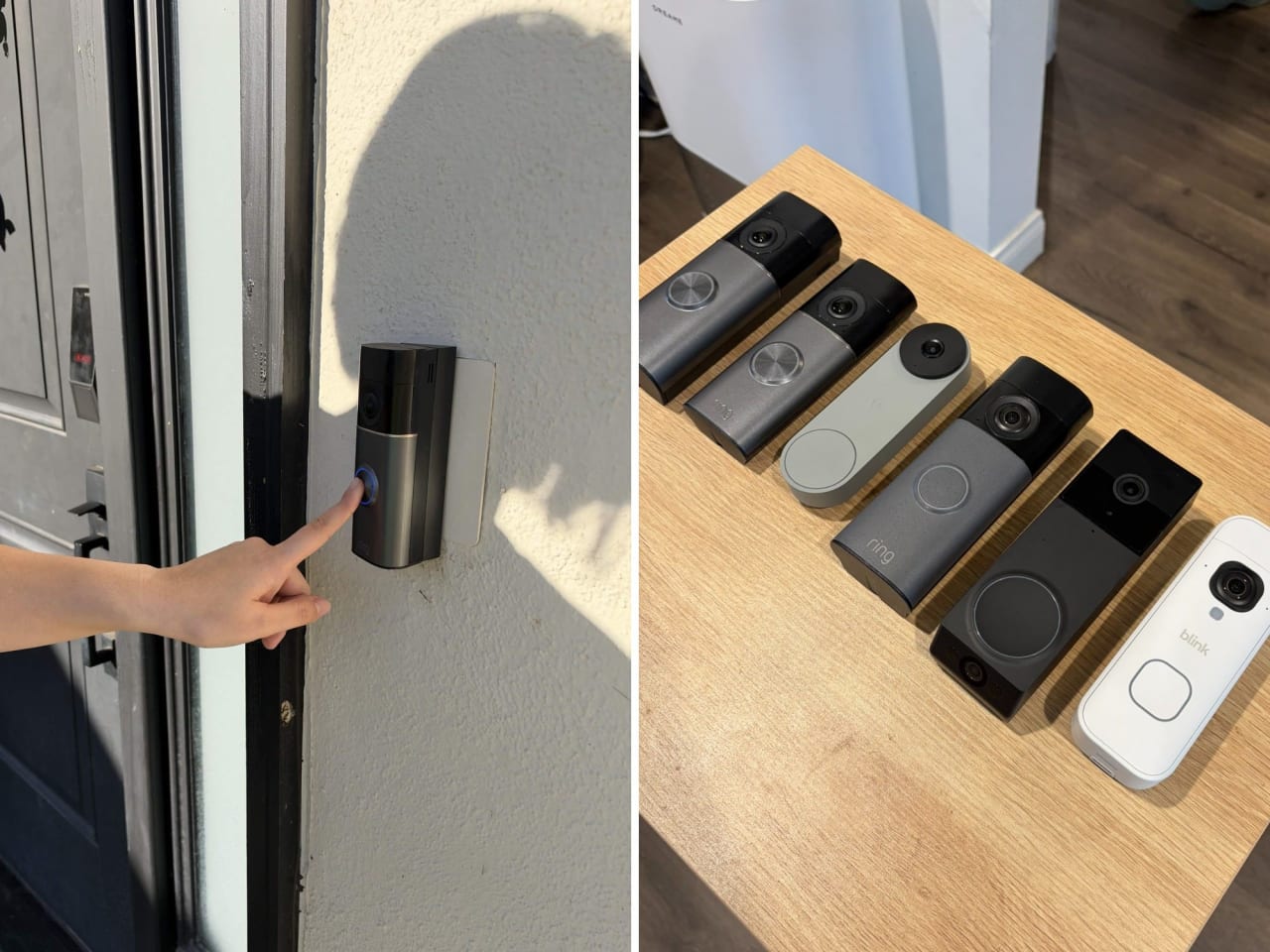
Some of the models I tested include (left to right) the Ring Pro Battery, Ring Pro Wired, Google Nest, Ring 2K Battery, Wyze Duo Cam, and Blink Battery 2K.
Sarah Saril/Business Insider
Blink Battery 2K : Despite making it into many reviewers’ top picks as a budget doorbell darling, the Blink Battery Doorbell fell short in one of the most important features of a smart doorbell: it failed to immediately notify me when someone was at the door. Its alerts were often 5-10 minutes late, which is an inexcusable delay for a device designed to help you respond immediately. It doesn’t matter how good the camera quality or how low the price is if your doorbell fails to tell you when someone is at your door.
Wyze Battery Video Doorbell : The Wyze Battery functions a lot like the Duo Cam, so at first glance, it seems like a shoo-in for this list. However, its extremely wide-angle lens lends an odd fisheye effect to video that doesn’t help the device’s overall lower-quality feed. Unlike some other options that didn’t make the cut in this guide, it’s not a bad doorbell; it still gets the job done. But if you’re looking for the best option for investing your money, I found that this model lacked visuals, making it a mediocre experience to use.
Eufy FamiLock S3 Max : This two-in-one smart lock and doorbell aims to simplify your smart home device roster by combining both features in one. It’s a very neat concept, and one that I loved — but I can’t offer the FamiLock S3 Max a place in this guide because it failed critically in the heat. After getting locked out of my house when the device overheated and shut down, I read the lock’s fine print and found an advisory warning against use in hot weather. Even if you don’t live somewhere warm, it’s impossible to recommend an option that might leave you locked out when you least expect it.
How we tested
Every doorbell I tested was installed on my front door, where I used it to test motion, alerts, and more.
Sarah Saril/Business Insider
Finding the best smart doorbell was a fun experience that involved a lot of doorbell installation, walking back and forth around my front door, removal, and the like. Here are some major evaluation points and how I tested them.
Preliminary research : There are a lot of video doorbells to choose from, and the market’s saturation can be very confusing for both newcomers to the topic and seasoned smart home veterans. I began by identifying what other guide writers, YouTube reviewers, and Reddit users highlighted as worthwhile picks, selecting industry favorites across a range of prices to test.
Installation : Unfortunately, setting up a video doorbell properly takes some effort, though some require more than others. Battery doorbells are on the easier side since you don’t need to fuss with wires, but you’ll still need to remember to charge them. Wired models can seem daunting, but they are much easier than you’d expect. For a doorbell to make this list, its instructions needed to be clear and easy to follow, requiring little to no prerequisite research. That said, you should always make sure your power supply is sufficient if you’re choosing a wired option.
Motion sensitivity and notifications : Motion detection is an important feature of video doorbells because many models won’t start recording until motion is detected. I tested every model with a range of motion at varying distances to see just how far it could reach, and what qualified as an “event” for each model.
Video quality : I checked the app for each doorbell at different times of day, assessing the live feed and recorded clips for changes in quality from lighting, movement, and clip length. A critical distinction I made early on was the gap between live-view quality and recorded quality, since compression often occurred when uploading clips to the cloud.
Smart home integration : Your average shopper won’t have both Alexa and Google to integrate with a doorbell, so I made sure to test both smart assistants with compatible devices to see which one works best for them. Usually, I live in an Amazon Echo-powered smart home, but during testing, I used both Alexa and Google to see how they compared.
Read the original article on Business Insider