
When you buy through our links, Business Insider may earn an affiliate commission. Learn more
We reviewed 65-inch TVs from brands like Sony and Samsung to find the best models for different needs.
Steven Cohen/Business Insider
For many rooms, a 65-inch TV offers an ideal balance between size and performance. This tier is large enough to immerse you in movies, games, and sports without completely taking over your space. But figuring out which models are actually worth the money isn’t always straightforward. Specs and marketing claims only tell part of the story, which is why my team and I test popular models year-round to find the best 65-inch TVs you can buy.
For most needs, the Samsung S90H 4K TV is my top pick overall. Its OLED panel delivers excellent contrast with deep black levels in a dark room, and its anti-glare screen does a good job of reducing reflections. If you’re trying to spend less, the TCL QM6K 4K TV is a good alternative. It’s not as bright as pricier models, but it offers impressive performance for the money.
I’ve been reviewing home entertainment gear for more than a decade, and that experience helps me spot a TV’s strengths and weaknesses. The best 65-inch TVs stand out because they get the fundamentals right: picture quality, smart features, ease of use, gaming capabilities, and overall value. The right choice still depends on your setup and priorities, but all of these picks deliver a great viewing experience.
Our top picks for the best 65-inch TVs
Best overall: Samsung S90H – See at Amazon
Best budget: TCL QM6K – See at Amazon
Best high-end: LG G5 – See at Amazon
Best RGB LED: Sony Bravia 7 II – See at Sony
Best overall
With its impressive balance between price and performance, the Samsung S90H is the best 65-inch TV for most needs. It offers excellent picture quality and a packed set of smart features, all for a very reasonable price. It’s often on sale for under $1,500, which is an incredible value for a display of this caliber.
The S90H’s OLED panel produces pixel-level contrast, while its anti-glare finish helps fight reflections during the day. That’s a rare and useful combination for shoppers who watch in various lighting conditions. The S90H also delivers solid brightness for an OLED: I measured roughly 1,440 nits at its peak, giving HDR movies, shows, and games plenty of punch.
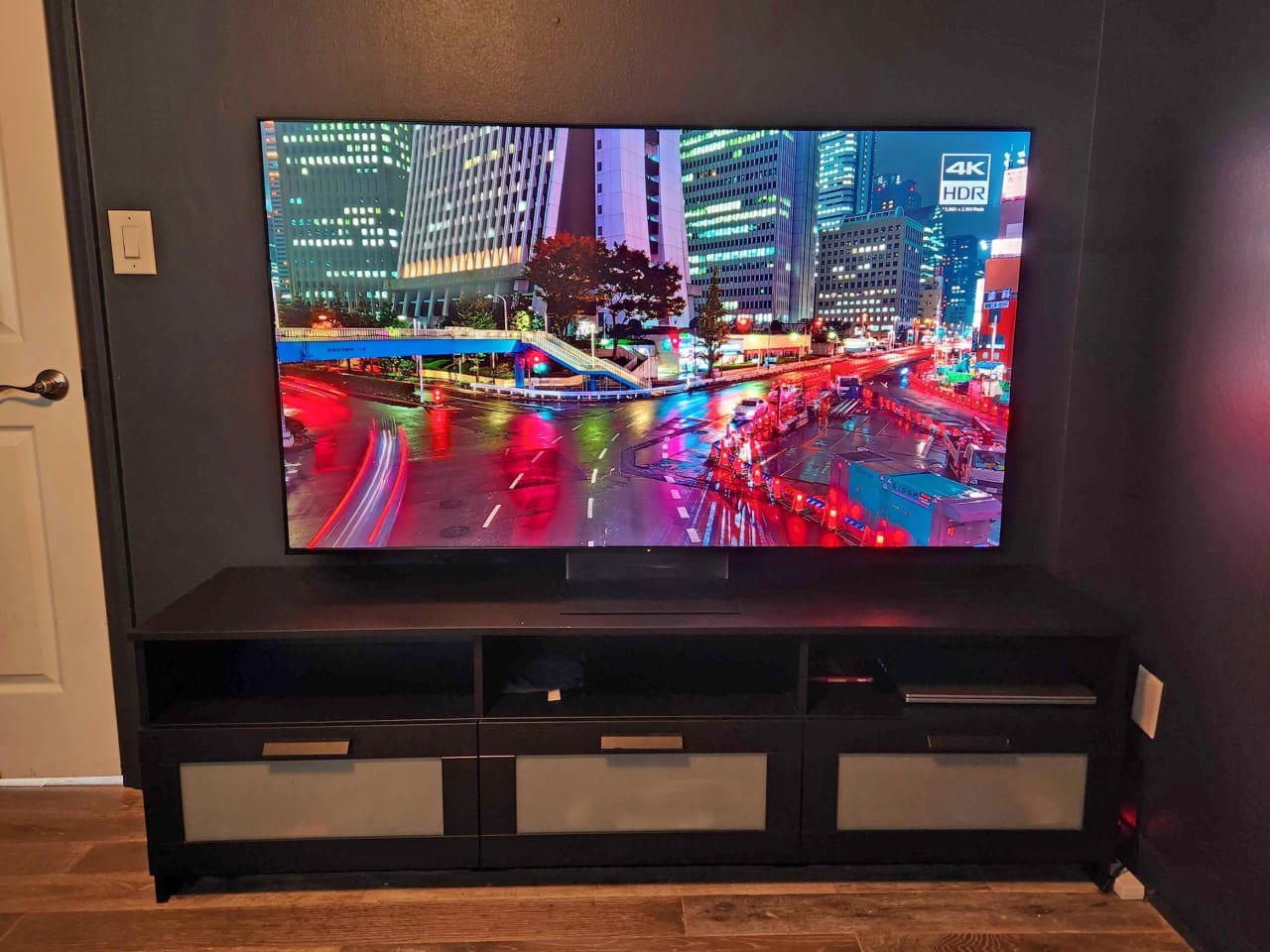
The S90H is an extremely versatile TV thanks to its OLED panel and anti-reflective screen.
Steven Cohen/Business Insider
The TV’s anti-reflective coating does have one tradeoff. Black levels can look a bit hazy when the room is brightly lit, but the screen does an excellent job preventing windows and lamps from becoming distracting mirror-like reflections. And in a dark room, black levels are essentially perfect.
On the downside, Samsung still leaves out support for Dolby Vision, the premium HDR format often favored for its accuracy. But HDR10 and HDR10+ look so good on this TV that I don’t consider this a big issue. Check out my HDR TV guide for more details on how different formats compare.
The TV’s upscaling is also very good with HD and lower-resolution video, though Sony’s top TVs retain a slight edge in processing. Whether you’re watching a movie at night or streaming football in a sunlit room, the S90H is equipped for it. Viewing angles are wider than any QLED or Mini LED set, so picture quality remains consistent even when viewed off-center.
Samsung’s Tizen smart TV platform is fairly snappy, with smoother navigation than older models. However, the interface still isn’t as intuitive as Google TV or Roku, so some users may prefer to invest in a streaming player. Gamers also receive great perks, including built-in access to Xbox Game Pass streaming and support for up to a 165Hz refresh rate when connected to a PC with an ultra-high-speed HDMI cable .
Read our full Samsung S90H TV review .
Check out our complete guide to the best Samsung TVs .
Best entry-level
The QM6K is proof that budget-friendly TVs don’t have to sacrifice performance. This QLED set is one of the most affordable displays with a Mini LED backlight, helping it stand out among similarly priced competitors.
Many 65-inch TVs in this tier have low contrast, dim images, and limited color capabilities. But the QM6K offers a wide range of vivid colors and delivers solid contrast and brightness for its class. Picture quality still isn’t on par with pricier TVs, but TCL has managed to pack in several advanced features while keeping the price attractive.
TCL’s QM6K is one of the most affordable TVs available with a 144Hz refresh rate and Mini LED backlight.
Steven Cohen/Business Insider
During my review, the TV reached 557 nits with a 10% HDR test pattern and about 736 nits with a 50% test pattern. Those are respectable numbers for a budget TV, and they’re good enough for a solid entry-level HDR experience. That said, the TV isn’t the best fit for rooms with lots of ambient light.
The QM6K’s Mini LED local dimming provides good contrast control, keeping dark portions of the image relatively dark. However, black levels appear slightly lighter than those on midrange and high-end QLED models, and they’re not as precise as those of an OLED. This is most evident when watching TV with the lights off. Although the viewing angles are slightly wider than those of TCL’s older Q65 model, the QM6K’s image still washes out when viewed from off-center.
But while most TVs in this price range are limited to 60Hz, the QM6K can reach 144Hz, making it an excellent budget gaming TV. This means you receive full support for 120Hz modes on a PS5 or Xbox Series X, enabling smoother motion in compatible games. I was also impressed by how quick the QM6K’s Google TV operating system is. It offers access to all the most popular streaming apps, and I didn’t encounter any notable glitches.
Though the QM6K remains my top budget pick, it now has tough competition from the new Hisense U6SF Pro . That model also uses a Mini LED backlight with local dimming, but it can get brighter, with a peak of around 1,200 nits. It also has a solid anti-glare screen that’s better at reducing reflections. However, the 65-inch U6SF Pro’s price fluctuates dramatically, often ranging from $600 to $1,100 over the last few months. For now, the QM6K is the more consistent value.
Read our TCL QM6K TV review .
Check out our guides to all the best budget TVs and best TCL TVs .
Best high-end
The LG G5 is my favorite high-end 65-inch TV. Though a couple of 2026 models have technically surpassed it, they cost a bit more, and the performance gap isn’t quite large enough to justify the price difference. This will likely change, but for now, I still give the G5 an edge.
This premium model’s biggest benefit over typical OLEDs is its exceptional brightness. Though OLEDs used to struggle with brightness, the G5 can actually outperform several flagship QLED sets. On an industry-standard 10% test pattern, I measured a peak of 2,410 nits using the set’s most accurate picture mode. That’s around 1,000 nits higher than midrange OLEDs like the Samsung S90H.
This high luminance provides bright HDR highlights, such as explosions and shimmering reflections, with a noticeable boost in overall impact. At the same time, the G5’s OLED screen maintains perfect black levels and pixel-level contrast control, so there’s none of the blooming or backlight patchiness that you might see on even the most expensive QLED TVs. Check out our QLED vs. OLED comparison for more details.
The G5 is our top high-end TV recommendation. (The pedestal stand is sold separately.)
Steven Cohen/Business Insider
The G5 also features wide viewing angles, ensuring the image doesn’t fade or wash out when you sit to the side of the TV. Gaming capabilities are strong, thanks to a maximum refresh rate of 165Hz on a PC or 120Hz on current-gen consoles like the PS5 and Xbox Series X. LG now also supports the Xbox app, which allows Game Pass members to stream games without an Xbox system.
Like all LG TVs, the G5 runs webOS, which is sufficient for most people’s streaming needs. However, I don’t love how much the interface emphasizes shopping recommendations, and its content curation isn’t the best. The G5’s fantastic image quality outweighs any of the software hiccups I ran into, but you can get a more reliable smart TV experience with other platforms, such as Roku and Google TV.
From a design perspective, the G5 boasts a premium aesthetic, high-quality materials, and a flush wall mount that enables seamless installation with no visible gaps. On the downside, this model does not include a pedestal stand. If wall mounting isn’t possible in your space, you’ll need to buy a stand separately.
Editor’s note: LG also offers a 2026 edition of the G5, called the G6 . I got a hands-on look at the G6, and it offers improved processing to minimize banding and a better anti-reflective filter. However, it still costs more than the G5. Dedicated enthusiasts who don’t mind extra should consider the G6, but the G5 remains the better value. You can learn more in my roundup of 2026 LG OLED TVs .
Read our LG G5 4K TV review .
Check out our guides to the best LG TVs and best TVs for picture quality .
Best RGB LED
RGB LED TVs are the latest innovation in display technology. Several brands have released various models, but Sony’s take on the tech, which it calls “True RGB,” has impressed me the most. The Bravia 7 II is its most affordable offering and delivers exceptional performance, balancing premium picture quality with a reasonable price. This is one of the few RGB LED TVs I’ve tested so far that genuinely offers better performance than most traditional QLED and Mini LED models.
The Bravia 7 II uses Sony’s True RGB backlight system with red, green, and blue diodes. This enables a wider, purer, and brighter range of colors than you’d get with a typical LED TV, which uses only white or blue light. You can learn more in our RGB LED vs. Mini LED comparison .
In practice, the Bravia 7 II produces gorgeous colors. I measured around 87% of the expanded BT.2020 color space. Though it’s rare for movies and TV shows to use BT.2020, such an extensive gamut is great for futureproofing, and the TV hits nearly 100% of the more widely used P3 gamut.
Deal alert: The 65-inch Bravia 7 II is $800 off at Sony and Best Buy . This is the biggest discount this model has received since its release in late May.
The Bravia 7 II offers rich colors and excellent contrast control thanks to its RGB backlight.
Steven Cohen/Business Insider
Sony’s True RGB backlight system delivers other benefits beyond color. Brightness is good for this tier, reaching around 2,243 nits, enabling impactful HDR highlights. The Bravia 7 II also has some of the best contrast control I’ve seen on an LED TV. Black levels are fantastic, with a deep, inky quality that often disappears in a dark room. I did see a faint hint of light bleeding into the black bars on some widescreen movies, but noticeable blooming was essentially absent.
Crosstalk, an artifact unique to RGB LED TVs, was also hard to spot. When crosstalk occurs, color from the RGB diodes spreads into areas of the image where it shouldn’t, causing inaccurate tinting and faint halos of color around certain objects. I only really noticed crosstalk on a few test patterns with colored text on a gray background, and it was never a concern when watching actual content.
The RGB backlight system also helped to enable wider off-axis performance. The TV actually lets you toggle the RGB backlight on and off when in Filmmaker Mode. I tried this while watching a scene from “Ex Machina” that’s bathed in harsh red light. With the color backlight setting on, the scene maintained a bold shade of red, even when I viewed the TV from an angle. But with the RGB backlight off, the red lighting shifted to a faded orange when viewed from the side.
I also love the Bravia 7 II’s Google TV interface, which is quick, easy to navigate, and packed with features, including Gemini AI voice control. The Bravia 7 II comes with Sony’s unique Mirage Stand, which uses optical refraction to hide cables routed behind it, making them almost invisible. It’s a cool little design choice that adds a bit of extra wow factor.
Sony also sells a step-up True RGB model, called the Bravia 9 II , that costs about $1,000 to $1,500 more and has nearly double the peak brightness, slightly better contrast, a rechargeable backlit remote, and a highly effective anti-glare screen. It’s a better fit for big enthusiasts with deep pockets, especially those with very bright rooms, but the Bravia 7 II gets remarkably close to matching the 9 II’s best features for less money.
Check out our guide to the best Sony TVs .
How we test 65-inch TVs
We evaluate key picture quality factors using a colorimeter, a pattern generator, and calibration software.
Steven Cohen/Business Insider
To select the best 65-inch TVs, our reviewers relied on hands-on testing, bolstered by more than a decade of experience covering home entertainment products. To test displays, we evaluate general picture clarity, contrast performance, HDR peak brightness, color, off-axis viewing, smart TV features, gaming capabilities, and value for the money.
Brightness, color, and other objective display attributes are measured using a colirmeter, a pattern generator, and Calman calibration software.
But while test patterns are essential for gauging a display’s capabilities, they only tell part of the story. What’s even more important is how a TV actually looks when displaying real-world content. With that in mind, we use these displays for day-to-day viewing and watch numerous scenes from movies and TV shows, selecting clips specifically to emphasize black levels, highlights, color capabilities, and upscaling. Our demo material includes a mix of 4K, 1080p high-definition (HD), and standard-definition (SD) content from streaming devices, cable TV, and Blu-ray discs. We also watch content under different lighting conditions to evaluate performance in bright and dark rooms.
The best 65-inch TVs will also feature excellent smart TV capabilities, so we test overall navigation speed, app stability, voice search, digital assistant integration, and additional perks like game streaming support.
For more info on our review process, visit our page detailing how we test tech products .
Meet the expert behind this guide:
Steven Cohen, senior tech editor: I’ve been reviewing home theater gear for over a decade, and every year my team and I test the latest TVs from all the big brands. I also studied film production, so I’m a big nerd when it comes to picture accuracy. I want movies and shows to look exactly the way their creators intended. I use professional calibration tools and benchmark discs to measure things like brightness and color performance, but those numbers only tell you so much. I also live with every TV I review the same way I would if I bought it myself — watching movies, streaming shows, gaming, and just flipping channels to see how it handles everyday viewing. The models in this guide rose above the rest and represent the best 65-inch TVs in their respective categories.
Learn more about the Reviews team at Business Insider .
65-inch TV FAQs
A 65-inch screen is a good size for a variety of rooms.
Steven Cohen/Business Insider
Is 65 inches a good size for a TV?
Traditionally, brands use 65 inches as their flagship size to showcase their most popular TVs, as it delivers big-screen immersion without occupying too much space. However, as the industry continues to adopt larger screen sizes, some companies have started using 75 inches as the entry point for their high-end offerings. Though it’s still rare to find a TV that’s not available in 65 inches, some premium sets, like the TCL X11L , aren’t sold in that size.
If you’re looking for a media console or mount to use with a 65-inch TV, check out our guides to the best TV stands and best TV wall mounts for our top picks.
Of course, you can still find excellent TV models in smaller sizes if you need something more compact. Likewise, top displays are available in larger sizes for an even more immersive experience.
Check out our other size-specific guides for more display recommendations:
Best 43-inch TVs
Best 50-inch TVs
Best 55-inch TVs
Best 75-inch TVs
Best 85-inch TVs
Best 100-inch TVs
How much should you spend on a 65-inch TV?
How much you should spend on a 65-inch TV really depends on the level of performance you’re after. Prices range from about $300 to more than $3,000. You can snag an entry-level 65-inch model for under $400, but we generally recommend stepping up to one of our picks above for a noticeably better experience.
If you’re shopping in the midrange, plan to spend between $550 and $1,000. This tier features strong 65-inch QLED options with local dimming and solid brightness levels, typically ranging from 600 to 1,800 nits.
Shoppers seeking upper-midrange or high-end performance can expect to pay between $1,000 and $4,000. In the $1,000 to $2,000 range, you’ll see premium QLED models capable of hitting up to 4,000 nits. Meanwhile, the best OLED TVs typically range in price from $1,300 to $4,000.
And good news for deal hunters: the best 65-inch TVs go on sale year-round. The deepest discounts pop up during events like Prime Day and Black Friday, as well as around sports events like the Super Bowl.
How far should you sit from a 65-inch 4K TV?
The benefits of a 4K screen are most noticeable when you sit at a distance of about one to 1.5 times the size of your TV. At that distance, you’ll be able to see the extra detail that 4K resolution offers compared to a 1080p high-definition screen. The ideal viewing distance for a 65-inch 4K TV is between 5.4 and 8.1 feet.
You can sit farther away and still enjoy a 65-inch 4K TV, but the optimal viewing distance will yield the best visible detail. Otherwise, you’ll want a larger screen to fully appreciate the benefits of 4K resolution.
Do 65-inch TVs have good sound quality?
Although many of the best 65-inch TVs have better built-in speaker systems than smaller displays, their performance is still limited compared to a separate soundbar or a surround sound setup. Speakers built into most TVs use small drivers, which can result in weak bass and muddy dialogue.
We recommend purchasing a soundbar to enhance your audio performance. For the most immersive experience, look for models that support Dolby Atmos , a spatial audio format that spreads sound effects throughout your room.
Check out our speaker and soundbar guides to see our top recommendations:
Best soundbars
Best budget soundbars
Best Dolby Atmos soundbars
Best soundbars with subwoofers
Best Bose soundbars
Best Sonos soundbars
Best surround sound systems
Read the original article on Business Insider